
Contact Us
Aug 28, 2023

How to Turn Off Suggested Actions in Windows 11

Ho Chi Minh city, Vietnam - June 2023. Surfae Laptop Studio photos for editorial use only. windows 11

When utilizing Windows 11 for your devices, the software has a feature called “suggested actions” that assists users with making phone calls as well as scheduling events. When this option is turned on, these “suggested actions” will appear whenever a user copies a future date or even a phone number the software recognizes.

However, some users may find this feature quite disruptive for users who frequently copy and paste data into different locations. Ultimately, this feature may interrupt a user’s workflow by automatically displaying suggestions such as making a call with Teams or Skype or adding an event in the Calendar app every time they copy what appears to be a phone number or a future date.

Additionally, this feature not only can break the flow of the task at hand but also clears the copied data, requiring users to exit the suggestion popup before continuing with their intended paste action.
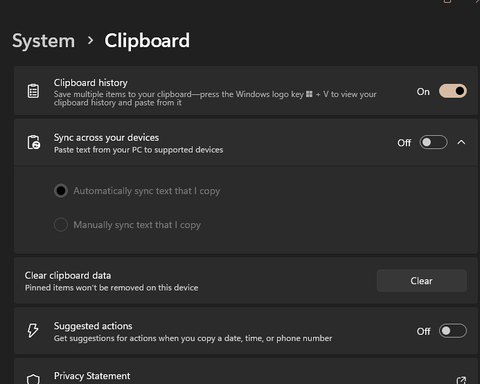
So, how do you turn this thing off?

  1. Find the Windows Icon at the bottom of your device’s screen.
  2. Go to “system” on the left-hand side.
  3. Locate the “settings” icon in the menu.
  4. Go to “clipboard.”
  5. Locate “suggested actions” and turn it off.

Follow this quick and easy method in order to turn off this action. If you have any questions, feel free to contact the SafePoint IT team!


Technology Insights

Stressed office employee sitting at a desk, holding her head while looking at a computer screen.

What happens when your company email gets blacklisted - and how long recovery really takes

By the SafePoint IT team · Managed IT & security since 2002 · 4 min...
Read More
Business owner reviewing rising AI costs on a laptop dashboard

Why Your Team's AI Bills Are Higher Than They Should Be (And the Habits That Actually Fix It)

If your business runs on Claude, ChatGPT, or any other AI assistant at scale, you've...
Read More
Small-business owner reviewing financial reports in a modern office, confident their QuickBooks Online data is backed up

Is Your QuickBooks Online Data Actually Backed Up? (Most Businesses Are Wrong)

Ask a business owner whether their QuickBooks data is backed up and you'll usually get...
Read More
chevron-down linkedin facebook pinterest youtube rss twitter instagram facebook-blank rss-blank linkedin-blank pinterest youtube twitter instagram